Default content
With default content, you can define which content is automatically loaded when a user enters a space.
This acts as the starting point of your workspace and ensures users immediately begin in the correct experience.
This is useful for guiding users directly into the intended experience, without requiring them to manually load content.
How does default content work?
Default content is only loaded when:
- There are no other users active in the space
- And there is no content active, or the current content is not the configured default content
This prevents users from interfering with each other’s sessions.
When the last user leaves the space, the system will check again in the next session whether default content should be loaded.
Open Workspace Configuration
You configure default content via the Workspace Configuration.
- Open the menu
- Go to
Settings - Go to
Workspace Configuration
First, enable Enable Workspace Configuration.
Then click Workspace Configuration to open the settings.
Settings
In this screen, you can adjust the Workspace Configuration settings.
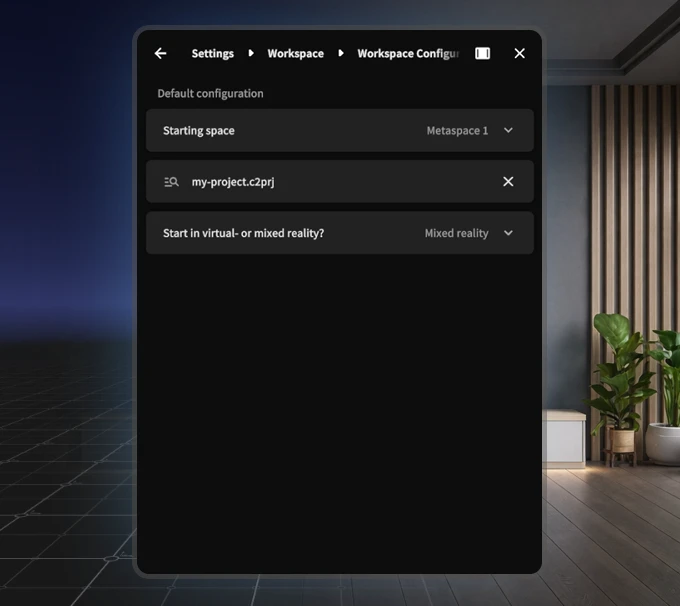
Within the Workspace Configuration, you have three options:
Starting space
Determines which space you start in.
- Default: Metaspace
- Depending on your workspace, this can be adjusted
Select default content
Here you choose which content is loaded automatically.
- This opens a file picker
- Select a
.c2prjfile from your workspace
Alternatively: you can also select a
.glbor.uplinkfile here
This could be, for example:
- A training scenario
- A menu environment (for example using Content Loader building blocks)
Start mode (Virtual / Mixed Reality)
Determines how the environment is launched:
- Virtual Reality → fully virtual
- Mixed Reality → integrated with the real world
- Headset setting → follows the headset setting
Practical use
Default content is often used to:
- Let users land directly in a starting environment or menu
- Make multiple scenarios accessible from a central location
- Simplify onboarding for new users